Sell the products. Let the China leg route itself.
Keep the suppliers you already buy from and skip the warehouse operations desk. When a WooCommerce order comes in, the plugin checks each line against your inventory in China and routes it on its own — supplier parcels get forwarded, stocked lines get picked and packed. You are asked for a decision in exactly one case: when a single order mixes both and guessing would cost you money.
Two things you normally have to give up. Here you keep both.
Most ways of fulfilling a WooCommerce order from China ask you to surrender something first: either your supplier relationships, or cash tied up in stock before you know what sells. The trade-off below is the reason this exists — not a claim about any particular provider.
Buy through a sourcing or dropshipping platform
Your supplier is replaced by their catalog. Pricing, quality and continuity stop being yours to negotiate.
You keep your own suppliers. WooliiPorter never buys the goods and never touches the purchase payment.
Ship inventory into a warehouse first
Every SKU has to earn a stock commitment before it has sold anything, so testing is expensive.
Stocking is optional and per SKU. A store can run on supplier parcel forwarding and hold no inventory at all.
Run both models side by side
A test SKU and a bestseller in the same basket usually means two systems and manual reconciliation.
One order, routed line by line against live inventory. Both fulfilment paths land in the same record.
THE DIVISION OF LABOUR
Three things stay yours. The rest runs without you.
This is the whole product in one table. If something is in the right column, nobody on your team has to do it, chase it, or re-type it into a spreadsheet.
You do
Buy from your suppliers. Your choice of supplier, your price, paid directly by you.
Enter the domestic tracking numbers for parcels a supplier is sending in.
Approve the packed quote before anything is dispatched.
Plus one decision, only when an order mixes stocked and unstocked lines.
Runs automatically
Routing every order line against live inventory the moment the order reaches processing
Reserving stock and raising the warehouse fulfillment order for stocked lines
Matching arriving supplier parcels to the order, with scan and photo evidence at intake
Consolidating, repacking and measuring before dispatch
Quoting the packed parcel from the live rate table — no manual quote queue
Merging China-leg and carrier events into one timeline, re-registering changed tracking numbers
Writing every charge back as a reconcilable line item
WHO THIS IS FOR
Stores that already have China suppliers.
You run a WooCommerce store and source physical goods from your own suppliers in China
You do not want to move purchasing to a sourcing platform or buying agent
Some SKUs sell steadily enough to stock; others are low-volume or still being tested
You want one record covering receiving, packing decisions, quotes and tracking
PER-LINE ROUTING
One order, three possible outcomes
Routing is decided per order line against current merchant-owned inventory, not per order and not per store. A product or variation can also be marked Always forward so it never consumes stock.
Stock for that line
What happens
Typical SKU
None held
Supplier parcel forwarding. Your supplier ships to your China warehouse address. The parcel is received, scanned, photographed and matched to the order, then consolidated and forwarded.
Long-tail and test SKUs, where tying up cash in stock is not worth it yet.
Enough held
Stocked fulfillment. Stock is reserved and the warehouse picks, packs and dispatches without waiting on a supplier. Goods stay merchant-owned throughout.
Steady sellers where holding inventory shortens delivery.
Some, not all
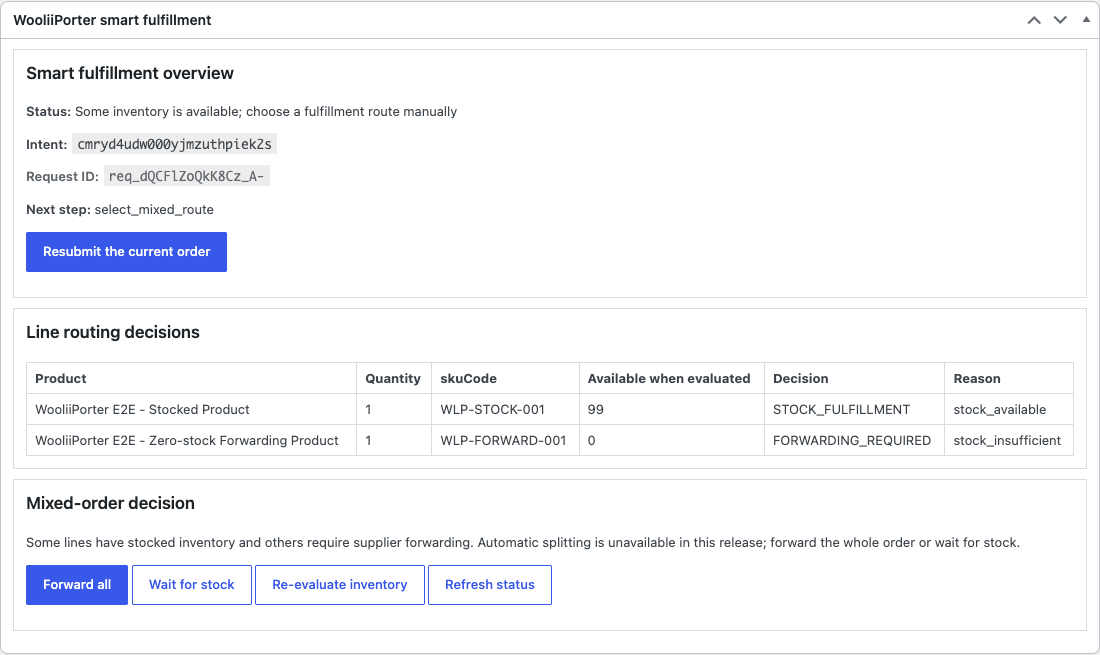
Held for your decision. Forward everything, wait for stock, or re-evaluate inventory. Version 0.4.0 never splits a mixed order on its own.
A basket mixing a bestseller with a long-tail item.
The only case that stops for you: a mixed order, held for an explicit choice rather than split on a guess. Interface capture from plugin 0.4.0; every store, order, SKU and tracking value shown is demonstration data from the release test environment.
TRACKING AND MONEY
One timeline to look at. One bill you can check line by line.
You stop chasing parcels
China-leg events — receiving, value-added work, consolidation, dispatch — and the international carrier's own events merge into a single order timeline. If a carrier reissues the tracking number mid-transit, it is re-registered automatically instead of going dark.
Availability and transit come from current route data. We do not publish day counts we cannot hold to.
You see the charge before dispatch
The parcel is measured after packing and quoted straight from the live rate table — there is no manual quote queue and nothing is added at decision time. You approve that packed quote before anything ships.
Estimates are always labelled separately from the final packed quote.
You can reconcile every line
The final bill is a list of fee line items that reconciles against the packed quote, so a charge can always be traced to the operation that caused it. Storage appears only if you chose to hold stock, itemised on the monthly statement and computed from the same stock-movement ledger as your inventory.
Merchant terms are scoped to your real parcel pattern in a workflow review, not published as a rate card. The public calculator shows personal-forwarding rates.
WHAT THE PLUGIN DOES
Submission happens in the background, never in checkout.
Test and connect validates the account, API-key environment, required scopes and routing flag, then registers the store
An eligible order reaching processing is sent through Action Scheduler — not during the customer checkout request
The fulfillment intent, per-line route facts, required action and diagnostic request ID are stored on the WooCommerce order
Status updates arrive over store-bound webhooks signed with HMAC over the raw body
Automatic submission and sandbox mode are off until you turn them on
Activation imports no historical orders and does not read your whole product catalog
WOOCOMMERCE · OFFICIAL SIDELOAD
The current build, with the checksum to verify it.
Version 0.4.0 is an official WooliiPorter early-access build for manual installation. It is not represented as WooCommerce Marketplace approved, and updates are manual until the official updater channel is enabled.
EARLY ACCESS / 2026-07-25WooliiPorter for WooCommerce
Active merchants download the reviewed ZIP from the Integrations workspace. Start with a sandbox API key; production access follows merchant activation.
WooliiPorter never buys from your suppliers or handles the purchase payment. You place and pay for supplier orders yourself.
02
No forced stocking
Stocking is optional. A store can run entirely on supplier parcel forwarding and never hold inventory.
03
No automatic mixed-order split
Version 0.4.0 pauses a mixed order for a recorded decision instead of guessing.
04
No WordPress Abilities or Shopify app
Version 0.4.0 exposes no WordPress Abilities and no Store-hosted MCP endpoint. There is no Shopify app.
OTHER WAYS IN
Not on WooCommerce, or not ready to connect a store?
The same merchant workflow is reachable without the plugin. Orders can be created by hand in the merchant console, or submitted from a custom system through Merchant API V1.
Yes — that is the intended setup. You choose your suppliers, place the orders and pay them directly. WooliiPorter never purchases goods and never handles the purchase payment; it receives what your suppliers send and coordinates the China leg from there.
GETTING STARTED
Connect a store without committing to anything.
Create the account, submit the integration application from inside it, and install the plugin against a sandbox key first. Merchant terms are scoped to your real destinations and parcel pattern once we can see them.
Create your merchant account. Takes a few minutes, no commitment.
Submit the integration application from inside the account — this is where you describe your suppliers, destinations and systems.
The merchant console opens on approval, along with sandbox API keys.